 |
 |
|
| VPHybridCAD family V13 - Overview | ||
 |
 |
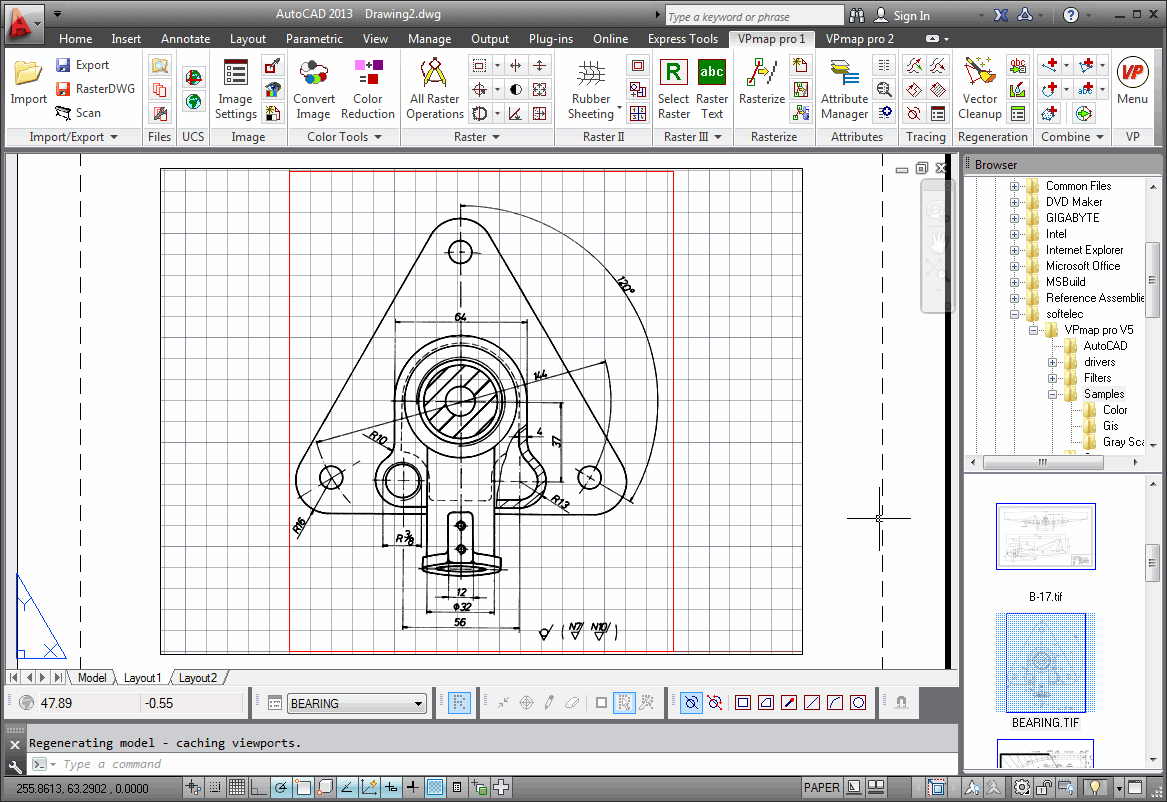 VPHybridCAD represents a line of five internationally awarded
software solutions, with a success story of more than 20 years:
VPHybridCAD represents a line of five internationally awarded
software solutions, with a success story of more than 20 years:
VPstudio -
VPstudio mono -
VPlite
VPraster -
VPraster edit
All VPHybridCAD solutions are designed to efficiently process legacy technical drawings in
CAD or documentation applications.
VPHybridCAD are world class software solutions for high-quality vectorization and fast hybrid scan editing.
With a stunning technology approach they seamlessly combine image processing and CAD technology. Excellent product quality and
intuitive handling are supporting many thousand users around the globe to improve, revise and convert scan drawings with less
effort.
VPHybridCAD software solutions offer complete automatic raster-to-vector conversion (vectorization) and a
unique hybrid editing technology. The hybrid editor tools allow simultaneous access to scanned raster and vector
data. You will be able carry out revisions or subsequent design work in drawing scans directly and accurately.
With just a mouse click even geometric details such as lines, circles, arcs and text become instantly available as
actual elements to be handled with CAD precision.
See more and test it yourself with a free demo version!
With all VPHybridCAD software solutions you can make
your choice whether you want to run them inside AutoCAD or if you prefer stand-alone
operation. Floating license network operation is provided at no extra costs.
The state of the art integrated text recognition module (OCR) supports next to latin also greek and kyrilic characters.
Optional an additional license for the 4 asian writings kanji, korean, and traditional and simplified chinese is available.
|
VPHybridCAD combines the benefits of raster-to-vector scan conversion with intuitive hybrid editing and design of both raster and vector objects. Even colored and gray scale drawings can be processed to optimize your workflows: + scan + cleanup + edit/modify/revise + raster-to-vector conversion (R2V) + rasterize + archive Available language versions: 


|
|



|
|
|
|
| Product Finder | ||
|
|
|
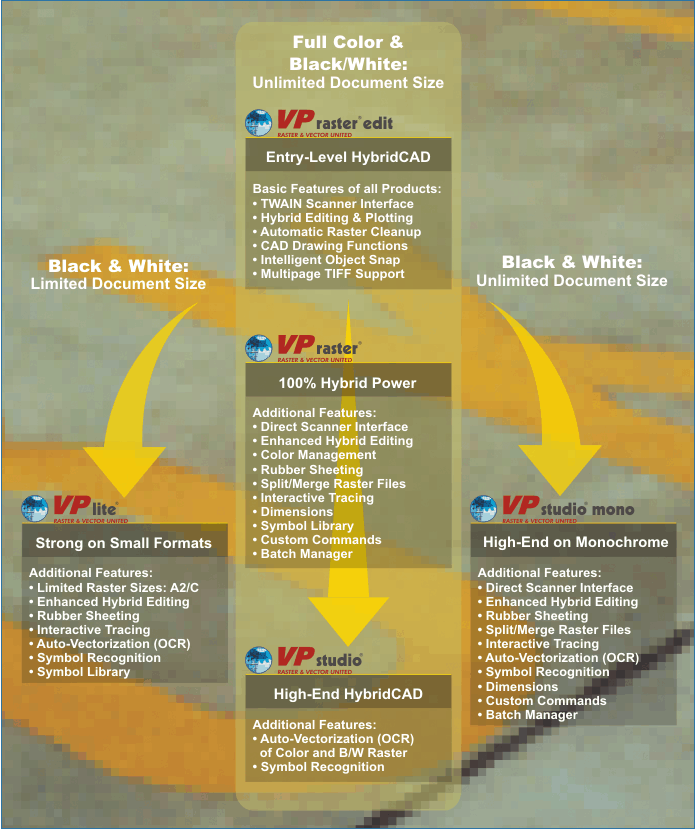
According to individual application needs VPHybridCAD comprises five different products to choose from.
Click on the features, functions and products of your interest in following diagram:
|
|
|
|
| 16 reasons to buy VPHybridCAD | ||
|
|
|
Click on "Explain..." to explore the details...
- One Product - Two Installation Platforms:
Stand-alone Windows, and AutoCAD (Explain...) - Multi Page TIFF and Multi Image Support (Explain...)
- CAD-like Command Line Interface (Explain...)
- TWAIN and Direct Scanner Interface (Explain...)
- "Design Raster like Vector!" - Enhanced Hybrid Editing (Explain...)
- Raster Clean-up, Scale, and Merge (Explain...)
- Multi-Point Rubber Sheeting, Geo Calibration (Explain...)
- Intelligent Object Snap (Explain...)
- Drag'n Drop of Vector and Raster Entities (Explain...)
- Managers for: Layers, Lines, Line Types, Text Styles and Colors (Explain...)
- Symbol Library Manager (= Network Clipboard) (Explain...)
- Easy Wizard for Single-Step Auto-Vectorization (Explain...)
- "Point-And-Vectorize", even for Color Element and Contour Tracing (Explain...)
- Extensive Color Management (Explain...)
- Morphology-based Raster Cleaning (e.g. line closing/thickening/thinning) (Explain...)
- Customizable Commands
(Explain...)
While the stand-alone installation provides fast execution of operations and easy handling, the AutoCAD installation has the possibility to simultaneously running other AutoCAD applications with VPHybridCAD. With VPHybridCAD you get both possibilities with one license!
|
|
|
|
| Brochures | ||
|
|
|
Here you find comprehensive information on VPHybridCAD!
In order to view and print the brochures you need the Adobe Acrobat Reader or a similar tool.
| VPHybridCAD, Complete Brochure, 4 pages, 600kb |


|
| VPHybridCAD, Specifications List, 1 page, 100kb |
|
|
|
|
|
| Documentation | ||
|
|
|
There are two types of documentation available:
Tutorial - This 220-pages training booklet guides you in 13 easy lessons
through the important areas and functions of VPHybridCAD.
Reference Manual - The 450-pages manual explains in 16 chapters each command
and function in detail, together with the command line syntax.
We recommend to use both pdf files as they complement each other!
| VPHybridCAD, Reference Manual, 6 MB |
|
| VPHybridCAD, Tutorial, 6 MB |
|
| (more languages can be found here) |